Kigo Video Converter Ultimate for Mac
Not only Video Converter Ultimate supports dvd ripping, multiple web video downloading, and screen recording functions, it newly adds DVD Creator function.
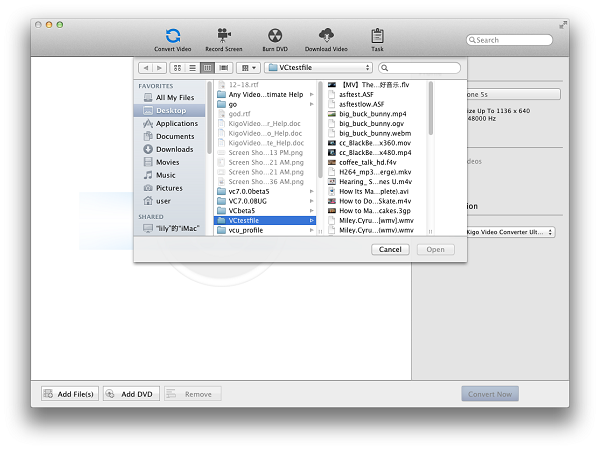
The Video Converter Ultimate supports all popular video formats including FLV, MPEG1, MPEG2, MP4, 3GP, 3G2, MOV, AVI, M2TS, MPEG TS/TP (for HD Video) etc and all types of DVDs to play on iPod, iPhone, iPhone 3G, PSP, PS3, Apple TV, PSP, Zune, Creative Zen, Archos and so on with perfect output quality and high conversion speed for Mac OS X users. It also offers users kinds of video editing options as you like
It's also a web video downloader to help users to download videos from website like YouTube, Google Video, Facebook and other popular video websites.
Besides as a screen recorder, you can record all the activities and options on the desktop in "Full Screen" or "Window region" with recording the coumputer output audio or not.
Finally, it is also a DVD creator to burn any MOV, MKV, MP4, AVI, WMV, MTS, FLV,MPG, MPEG, HD videos, etc videos into DVD disc or DVD Folder. You can also customize DVD with free yet gorgeous DVD menu as you like.
Version: 5.1.4 Size: 42.7 MB Support OS: Mac OS X 10.6, 10.7, 10.8 / Intel-based Only.
- Video / DVD Converter
- DVD Creator, burn HD / SD videos to DVD
- Download videos from 100+ video websites
- Edit videos as you like
- Full screen HD capturer and recorder
- Multilanguage support, including English, German, French, Japanese
To get the version for OS X 10.5 or early, please click here
Convert any Videos / DVDs
Support any videos
Support all popular video formats including FLV, MPEG1, MPEG2, MP4, 3GP, 3G2, MOV, AVI, M2TS, MPEG TS/TP (for HD Video) etc and all kinds of DVDs like DVD Folder, DVD disc, ISO file, IFO file, DVD media.
Extract audio from Video / DVD
Need only the audio files? Don't worry, it can also extract audio files from the videos / DVDs and can be saved as MP3, AAC, WMA, OGG and other audio formates for use.
Work for various portable video players
Convert videos / dvds foriPod, iPhone, iPhone 3G, PSP, PS3, Apple TV, PSP, Zune, Creative Zen, Archos and so on with perfect output quality and high conversion speed for Mac OS X users.
Standard 2D videos to 3D conversion
3D videos are more and more popular, now you can convert your standard 2D videos to 3D. Before you watch 3D movies, you need 3D glasses and 3D TV or monitor.).
Websites video downloader and converter
Download videos from multiple video websites
There are a series of videos websites to download supported by the video downloader like break.com, comedycentral.com, dailymotion.com, facebook.com, liveleak.com, howcast.com, metacafe.com, movieclips.com, mtv.com, mtvhive.com, photobucket.com, southparkstudios.com, thedailyshow.com, veoh.com, youtube.com, youku.com and so on. It will be more in the future.
Support batch download videos
You can import a series of DVD download urls and download them in batch. You can use "Max count of download tasks" to set several tasks at a time up to 5. The default task is 3.
Customize the download directory
Before you download the videos, you can customize the download directory through the main menu "App Name->Preferences->Download". You can also use the default Download Directory is /Users/user/Movies/Kigo Video Converter Ultimate/Download.
Screen Recorder
Two modes to record screen
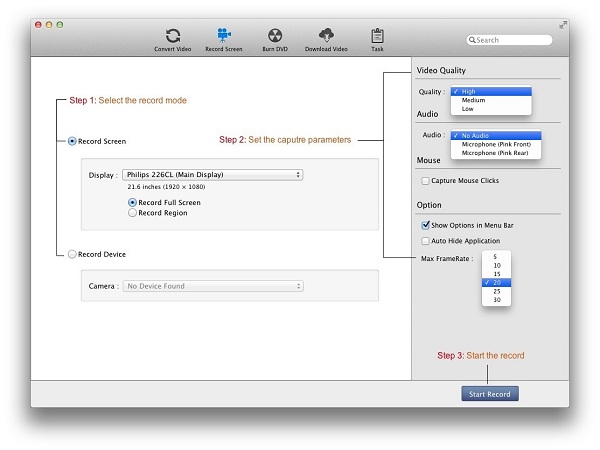
You can choose to use full screen or window region to record your desktop activies to creat software or program tutorials or website demos.
Multiple FPS values for you to choose
The program provides multiple FPS value for you to choose, including 30, 25, 20, 15, 10, 5, the more FPS, action will be displayed more smoothly.
Option to record computer output audio or not
If you want to record computer output audio, you need to install an audio driver. When you first check the box beside Record computer output audio on. You should get a prompt to tell you install the audio driver.
Preview video and import to convert
After you stop the recording, the recorded file will be added to Video/DVD window and wait to convert. You can preview it, and convert it according to your need.
DVD Creator
Burn videos to DVD
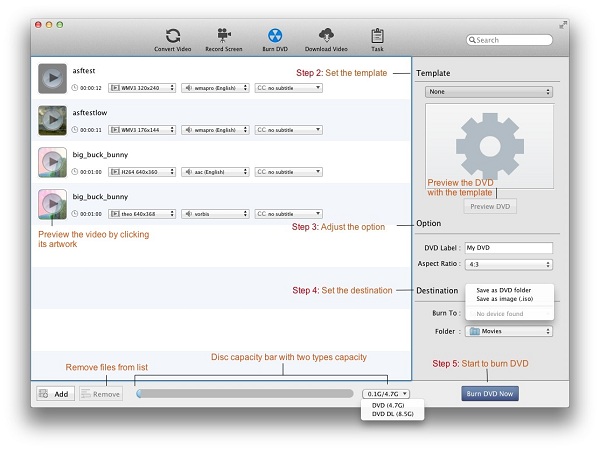
Burn regular video formats like MOV, MKV, MP4, AVI, WMV, MTS, FLV,MPG, MPEG, SD / HD videos, etc. to DVD device or DVD Folder.
Provide users with diversified DVD Menu Templates
Before you burn to DVD, you can choose the suitable DVD menu template supported by Kigo Video Converter Ultimate.
Customize Aspect ratio of the video
Set the Aspect ratio of the video like as 4 : 3 or 16 : 9 before you burn video to DVD.
Not only burn the standard video formats like MOV, MKV, MP4, AVI, WMV, MTS, FLV,MPG, MPEG, HD videos, etc. to DVD, you can also edit videos such as cropping videos, adding effects and adding watermark to videos, etc before you burn to DVD. As you need, you can preview the original and output Menu before you create DVD with the built-in player.
Edit videos if necessary
Crop Frame Size to Retain What You Want
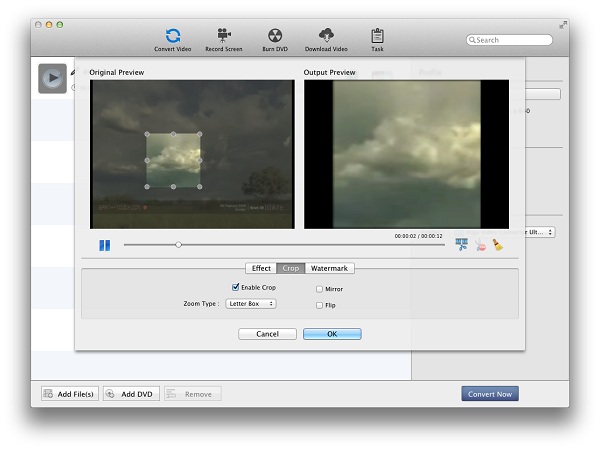
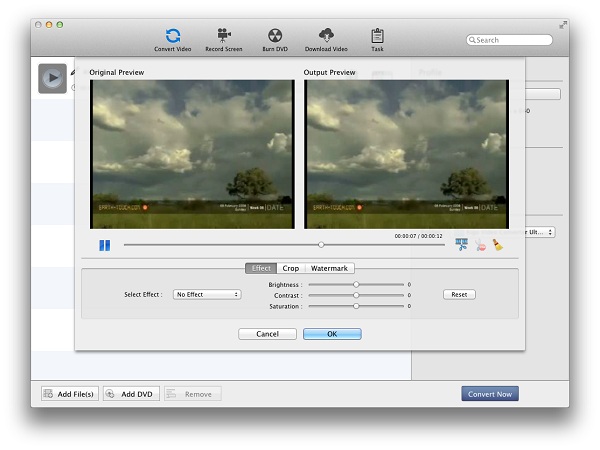
Crop the picture frame of a video to remove any unwanted areas from it using this video converter like a pair of smart scissors.
Adjust Video Settings and Add Special Effects
Adjust video brightness/saturation/contrast. Add special effects such as as Mirror, Flip, Noise, Smartblur to make your video look special.
Add Watermarks to Video
Personalize your video with multiple picture and/or text watermarks added.
Merge videos into one
If there are several files in the file list, just drag the videos to another video, and then they will be melt one automatically. But You can't edit effect and add subtitles to the merged file, and can't merge DVD or screen recorded file.

High conversion speed and easy to use
Simple User Friendly Interface
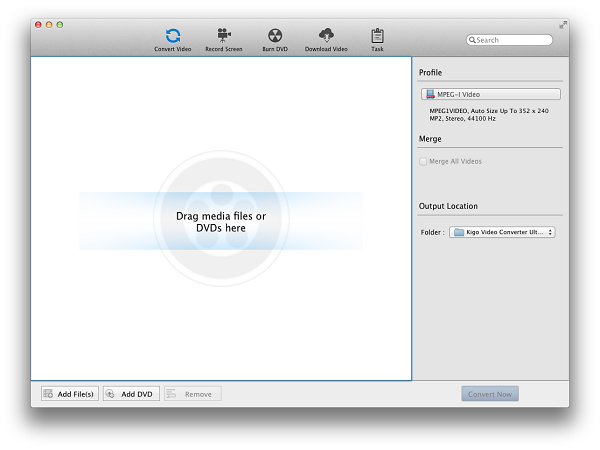
With the interface and quick guide on the interface, you can use the video converter to convert your videos, rip dvds or edit video just in a minute.
Multilanguage support
Not only English is supported, German, French, Japanese languages are also added. As you need, you can find a suitable one.
Batch Conversion supported and advanced output settings provided
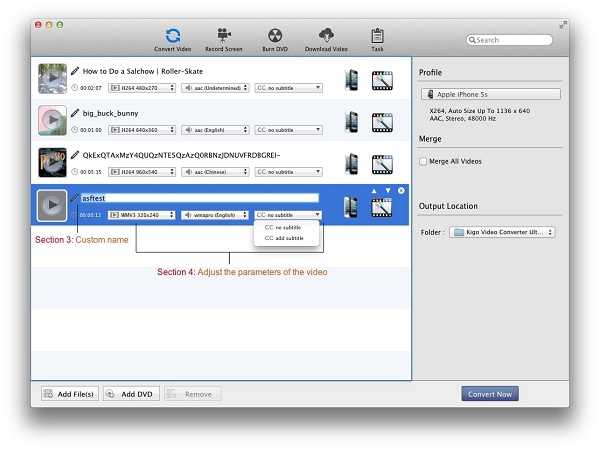
With batch conversion mode, you can convert multiple files in one conversation and customize output parameters for target files, like bitrate, frame rate and sample for output audio files.
High conversion speed
High performance on the conversion speed and output quality. Kigo Video Converter Ultimate for Mac does a perfect DVD ripping and video converting job for you.
Compatible with most popular Mac OS
It's compatible with Mac OS X 10.5 Leopard, 10.6 Snow Leopard, Mac OS 10.7 lion, etc.
- Mac OS X 10.6, 10.7, 10.8
- At least 512M physical RAM
- 1G Hz Intel processor, or above