Kigo Video Converter Pro for Mac OS X

Good news: Kigo Video Converter Pro has been updated to the primary version of Kigo Video Converter Ultimate. Meanwhile, all the users, who have purchased the previous one, can get free upgrade.

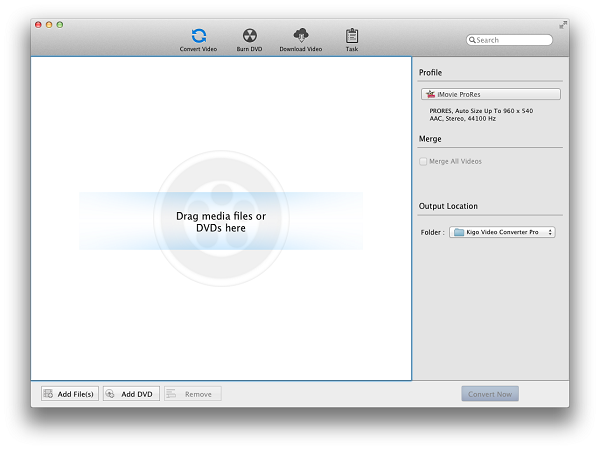
Kigo Video Converter Pro is an all-in-one video converter for iPhone, iPod, PSP, Zune, 3GP Phone, MP4 player and more on Mac OS X.

No matter videos from computer hard disks or YouTube, they can be perfectly converted to MP4, WMV, AVI, 3GP, 3G2, FLV, SWF, MPG, MP3, OGG, WAV, AAC. WMA and more with perfect output quality and high conversion speed on Mac OS X.

Besides, this software comes with lots of useful and funny video edit functions for you, like trimming video clips, merging and cropping videos, set special effects, adding watermark on videosanding subtitles to videos.

Kigo Video Converter works perfectly for almost all popular video players like iPod touch, iPod classic, iPod nano, iPhone, Apple TV, PSP, PS3, Creative Zen, iRiver PMP, Archos, various video mobile phones and like this.

There are much more about this video converter for Mac, so why not have a try to explore the interesting and useful functions of Kigo Video Converter Pro by yourself?

Version: 5.0.1      Size: 29.6 MB      Support OS: Mac OS X 10.5, 10.6

    • Support Most video formats, such as FLV, MPEG2, MP4, 3GP, 3G2, MOV, AVI, M2TS, MPEG TS/TP.
    • Work for many popular video players like iPod, iPad, iPhone, PSP, etc.
    • Download videos from YouTube
    • Preview and Capture your favorite pictures from videos
    • Extract audio from video
    • Crop video size
    • Set Grey, Mirror, Flip, Noise or Smartblur effects on videos
    • Trim video clips and merge video segments into one file
    • Add customized image watermark or text watermark onto your movies.
    • Set video effects by adjusting video saturation, contrast and brightness

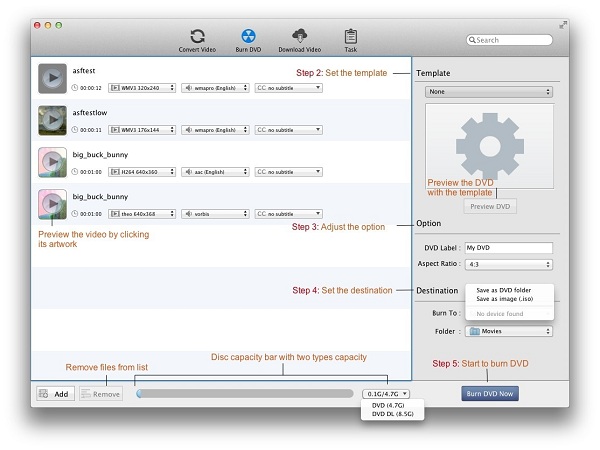
    Kigo DVD Converter for Mac OS X is a more powerful video converter. It not only includes all functions of Kigo Video Converter Pro, but also a DVD Ripper.

Key Feature
Video to PSP

Support All Popular Video Formats

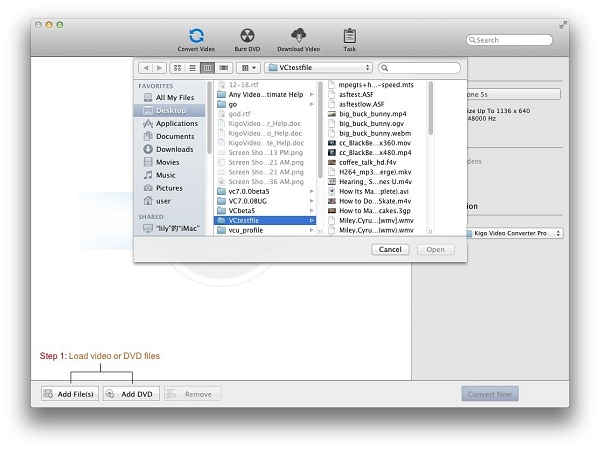
Kigo Video Converter Pro supports converting nearly all video formats, such as FLV, MPEG1, MPEG2, MP4, 3GP, 3G2, MOV, AVI, M2TS, MPEG TS/TP (for HD Video), M4V. And the conversion speed is quite fast. Within a few minutes, you can get high quality converted files.

User defined output format supported

Multiple preset profiles for many kinds of popular portable media players

Kigo Video Converter Pro works for quite a large number of popular portable media players, like iPod, iPhone, iPhone 3G, PSP, PS3, Apple TV, Zune, Creative Zen, Archos, mobile phone and so on. If you are bothered about putting AVI movies in your iPod, or other similar problems concerning video formats , Kigo Video Converter Pro is undoubtedly the best solution. With it, you can convert nearly all sorts of videos to MP4, WMV, AVI, 3GP, 3G2, FLV, SWF, MPG and more video format, thus you can play whatever format of video on your portable media player at will.

Besides, Kigo Video Converter Pro supports extracting audio from video in MP3, OGG, WAV, AAC or WMA audio formats.

User defined output format supported

Convert YouTube videos

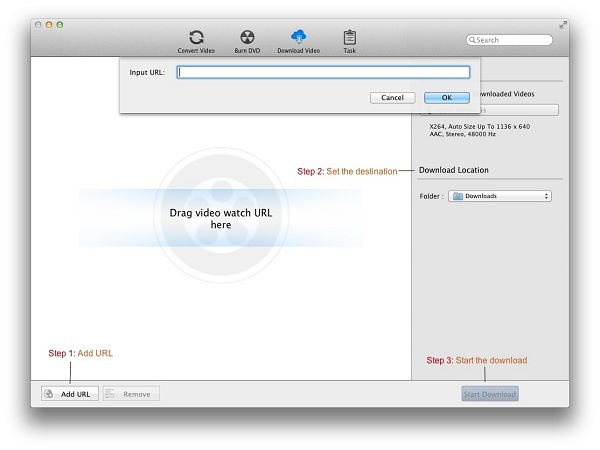
Kigo Video Converter Pro builds in a video downloader for helping Mac users to convert YouTube videos. This video downloader supports bach video download, and it is absolutely convenient for you to convert online videos.

Video to PSP

Clip, merge and crop videos

Trim videos into segments
What if the video is too big for your portable media player, and what if you just want some parts instead of the whole video? Well with Kigo Video Converter Pro, you can get your favorite video clips with favorable video format by trimming videos into your favorite segments.

Merge video clips into one
Kigo Video Converter supports merging video clips into one. Don't you think it is very interesting to make your own video by merging your favorite video parts together?

Crop videos to small screen size
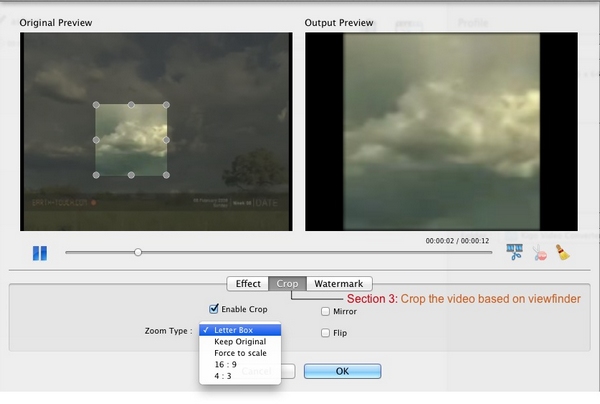
Want to get rid of black edges, commercial logos or anything else that on a video to affect your video enjoyment? Cropping videos into a smaller screen size can well dealt with problems above. With Kigo Video Converter Pro, you can adjust the size of crop frame at will to crop your videos.

Set special effects on videos
Kigo Video Converter Pro supports individualizing videos by adjusting the values of Brightness, Contrast and Saturation. Besides that, you can set special effects, like Grey, Mirror, Flip, Noise or Smartblur effects on videos as well. Each video effect presents you different visual experience. You can set any of video effects according to your preference.

Add watermarks on videos

More interestingly, Kigo Video Converter Pro enables you to add picture watermark or text watermark on videos. Any picture or text can be added on videos as watermark. Then, you can enjoy the super cool videos which edited by yourself.

Optimized Profiles

Fully customizable output parameters

There are rich options like video codec, size, bitrate, framerate, aspect ratio for output videos and audio codec, bitrate, channel, sample rate, A/V sync for output audios. You can adjust the parameters as you wish. However, it is better to keep the default settings, which assure high-quality converted videos for you.

Video to iPod iPhone

Batch Video Conversion

This mode makes batch file conversion simple. Create a batch list of any different formats and convert them all to a single selected format. The converted files will be saved to a pre-selected directory folder and the original files will remain untouched.

What's New about Kigo Video Converter Pro
  • New user interface to be consistent with KVC Ultimate version.
  • Support 20+ web video downloading.
  • DVD Ripping function added.
  • Add more output profiles.
  • Support uploading video to Youtube after conversion finished.
  • Intel-based version only.
System Requirements
  • 10.5 or later
  • At least 512M physical RAM
  • Since version 5.0.0, KVC Pro only has Intel-based version.
  • 1G Hz Intel or PowerPC processor, or above

Learn in converting to popular MP4 player

DVD to iPod & iPhone

Play Any Video on iPod & iPhone

Converts any video formats to play on iPod & iPhone. Learn more

DVD to PSP

Convert Any Video for PSP

Converts popular video to PSP format, to enjoy video on PSP. Learn more

DVD to Zune

Convert Video to Zune Format

Software to converts video easily to play on Zune. Learn more